Item Replenishment Setup
Configure how Business Central refills inventory — Purchase, Production, Assembly, or Transfer — with manufacturing policies and flushing methods.
Learning Objectives
- Choose the correct Replenishment System for each item
- Configure Make-to-Stock vs Make-to-Order policies
- Understand flushing methods and production costing parameters
Overview
The Replenishment section on the Item Card defines how Business Central refills inventory when stock is low.
"When I need more of this item, how should the system get it?"
This setup is essential for Planning Worksheets, Requisition Worksheets, MRP, and avoiding stock shortages or overstocking.
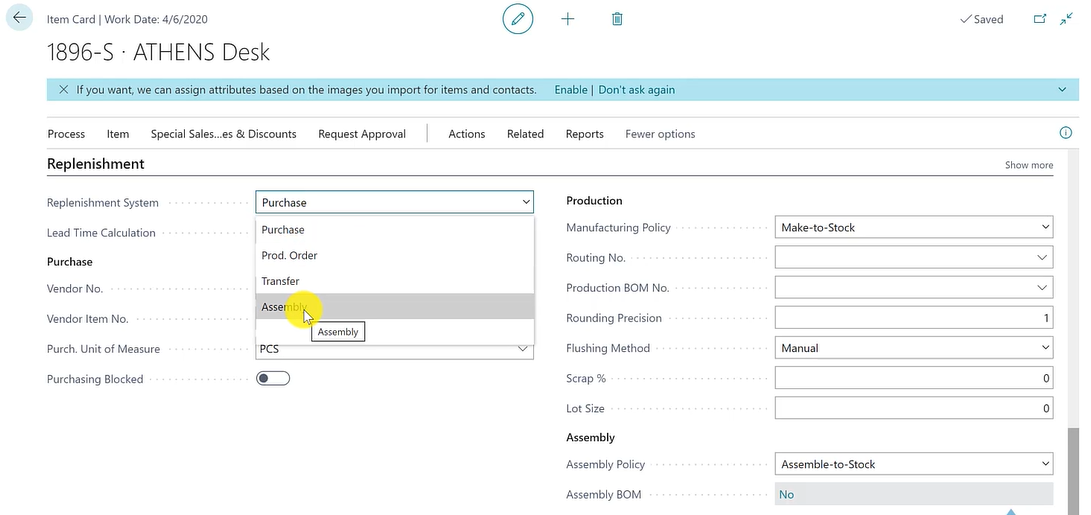
Replenishment System Options
| System | Creates | Use When |
|---|---|---|
| Purchase | Purchase Orders | Item is bought from a vendor |
| Production (Prod. Order) | Production Orders | Item is manufactured internally |
| Assembly | Assembly Orders | Item is built from components |
| Transfer | Transfer Orders | Item is supplied from another location |
Lead Time Calculation
Defines how long replenishment takes (e.g., 5D = 5 days). Used by planning to calculate order dates and expected receipt dates.
Production Order Deep Dive
When to Choose "Prod. Order"
Choose when the item is manufactured, not purchased. BC will generate Production Orders and plan materials and operations automatically.
Manufacturing Policy
| Policy | Behavior | Best For |
|---|---|---|
| Make-to-Stock (MTS) | Produce in advance, store in inventory | Predictable demand |
| Make-to-Order (MTO) | Produce only when demand exists | Customized or low-demand items |
MTO can link Production Orders directly to Sales Orders.
Production Structure
- Routing No. — HOW to produce (operations, work centers, times)
- Production BOM No. — WHAT is needed (raw materials, quantities per unit)
One Routing or BOM can be reused across multiple items.
Quantity & Planning Parameters
| Parameter | Purpose |
|---|---|
| Rounding Precision | Prevents unit conversion rounding errors |
| Lot Size | Standard production quantity for cost calculation |
| Scrap % | Expected production loss — increases material consumption |
Flushing Methods
Defines when materials are consumed during production:
| Method | Timing |
|---|---|
| Forward | At order release |
| Backward | At order completion (most common) |
| Manual | Via Consumption Journal (high control) |
Cost Management
Overhead Rate adds indirect costs (maintenance, utilities, factory expenses) to the standard cost calculation.
End-to-End Behavior
When demand occurs:
- BC detects demand
- Checks replenishment setup
- Generates Purchase, Production, Assembly, or Transfer Orders
Example: Rim (Manufactured Item)
- Replenishment = Production Order
- Policy = Make-to-Stock
- BOM = Steel + Screws
- Routing = Cutting → Shaping → Finishing
→ System creates Production Orders, reserves materials, schedules operations, calculates costs.
Pro Tip
Practice this full cycle: Sales Order → Planning Worksheet → Production Order → Consumption → Output → Inventory. This is the real-life flow used in projects and MB-800 interviews.
Key Takeaway
Replenishment defines how BC automatically ensures you never run out of stock. Combined with Planning parameters, it creates a fully automated supply chain flow.